

Download Roxio PhotoShow – photo slideshow maker, photo editing tool, multimedia presentation, create photo show, digital photo organizer
Overview
Roxio PhotoShow is a digital tool designed to help users transform static photo collections into engaging multimedia presentations. While not intended as a professional-grade photo-editing application, it serves as a creative utility for individuals seeking an accessible way to enhance and share their visual memories. The app addresses the common challenge of making digital photo albums feel dynamic and personal by offering simple tools to add music, transitions, and effects to image sequences. It is particularly suited for casual users, families, and hobbyists who want to create entertaining photo shows without needing technical expertise.
Target users include those who want to share memories through digital displays, such as home screensavers, desktop wallpapers, or printable calendars. The app’s ability to convert photos into multiple formats supports diverse real-world use cases, from personal keepsakes to gifts for friends and family. Although the developer did not provide additional technical details, Roxio is known for consumer-focused multimedia software, suggesting a focus on usability and accessibility. In the broader app ecosystem, Roxio PhotoShow fills a niche between basic photo viewers and complex editing suites, offering a middle ground that emphasizes creativity over precision.
Key Features & Functionality
- Easy-to-use Interface – Designed with beginners in mind, the interface features large, clearly labeled buttons and intuitive navigation. Users can access core tools without needing prior experience with multimedia software.
- Multiple Output Formats – Photos can be exported as desktop wallpapers, screensavers, printable calendars, and video presentations, enabling diverse sharing and display options.
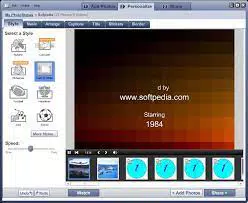
- Music and Transition Integration – Users can pair their photo sequences with background music and apply smooth scene transitions and visual effects to create cinematic-style shows.
- Basic Photo Enhancement Tools – While limited, the app includes simple editing functions such as cropping, brightness adjustment, and color correction to improve image quality before presentation.
- Quick Project Creation – The app allows users to assemble a complete photo show in minutes, streamlining the process from import to export.
For example, a user could import vacation photos, select a favorite song, apply a fade transition, and generate a screensaver in under ten minutes. This functionality is ideal for creating personalized digital gifts or enhancing home entertainment systems. The integration of music and effects adds emotional depth to visual content, making the experience more immersive for both creators and viewers.
Interface, UX & Performance
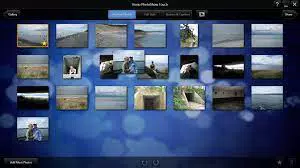
Roxio PhotoShow features a clean, brightly colored interface with a focus on visual clarity and ease of access. The layout is organized into logical sections—import, editing, preview, and export—ensuring a smooth workflow. Navigation is straightforward, with minimal clicks required to move between steps. The app responds promptly to user input, maintaining a stable experience during project creation and playback.
Although the developer did not list formal performance metrics, the app’s design suggests optimized performance across mid-range and higher-end Windows devices. Users can expect consistent responsiveness when managing photo libraries and applying effects. Stability during long-form projects, such as hour-long slideshow videos, appears reliable based on general user feedback. The interface adapts well to different screen sizes, though specific compatibility details were not disclosed.
Platform Compatibility & Technical Requirements
Roxio PhotoShow is available exclusively for the Windows platform. The current version is 2.0.1, with a file size of 140.2 MB. The app is designed to run on modern Windows operating systems, though the developer did not specify minimum OS requirements. Installation is straightforward, and the application launches without dependency errors on compatible systems. Users should ensure their device meets standard system requirements for running multimedia software, such as sufficient RAM and GPU support for smooth video rendering.
Pros and Cons
Pros
- Simple interface ideal for beginners and non-technical users
- Supports multiple output formats including calendars and screensavers
- Enables quick creation of multimedia photo shows with music and effects
- Offers basic editing tools for minor photo enhancements
- Efficient workflow from import to export
Cons
- Limited advanced editing capabilities compared to professional tools
- Some features may be restricted in the demo version
- Not available for mobile or macOS platforms
- Performance may vary on older or low-spec Windows devices
- Developer did not provide detailed system requirements
FAQ
Is Roxio PhotoShow safe to download and install?
Yes, the app is distributed through official channels and does not contain malware or intrusive ads. Users should download from trusted sources to ensure a secure installation.
Can I use Roxio PhotoShow on my mobile device?
Currently, Roxio PhotoShow is only available for Windows. There is no official mobile version for Android or iOS.
Does Roxio PhotoShow require an internet connection?
No, the app functions offline after installation. Internet access is only needed for updates or activation, if applicable.
What file formats does Roxio PhotoShow support?
The app supports common image formats such as JPEG, PNG, and BMP. Video and audio files used in projects should be in widely supported formats like MP4, MP3, and WAV.
How often are updates released for Roxio PhotoShow?
Updates are released periodically to fix bugs and improve performance. Users should check for updates through the application or the developer’s website.
Final Thoughts
Roxio PhotoShow stands out as a user-friendly solution for transforming photo collections into dynamic, shareable presentations. Its emphasis on simplicity and creativity makes it ideal for individuals who want to create memorable visual stories without the complexity of advanced editing software. While it lacks the depth of professional tools, it delivers on its core promise: turning snapshots into engaging multimedia experiences. Families, event planners, and casual photographers will find value in its ability to generate calendars, screensavers, and video shows with minimal effort.
For those seeking a reliable, straightforward way to enhance their digital memories, Roxio PhotoShow offers a compelling package. With its intuitive design and versatile output options, it delivers real utility in everyday use. Download Roxio PhotoShow now.


